
CxC bots cover a lot of ground, but sometimes you want coaching on something only your shop cares about. Maybe you want every outbound call reviewed for how the rep handles price questions, or every high-dollar job checked for a proper walkthrough with the homeowner. The bot builder lets you set that up yourself, from what kicks the bot off to which jobs it applies to.
How to create a bot
Go to the Bots page, and select Create Bot. The builder walks you through five steps.
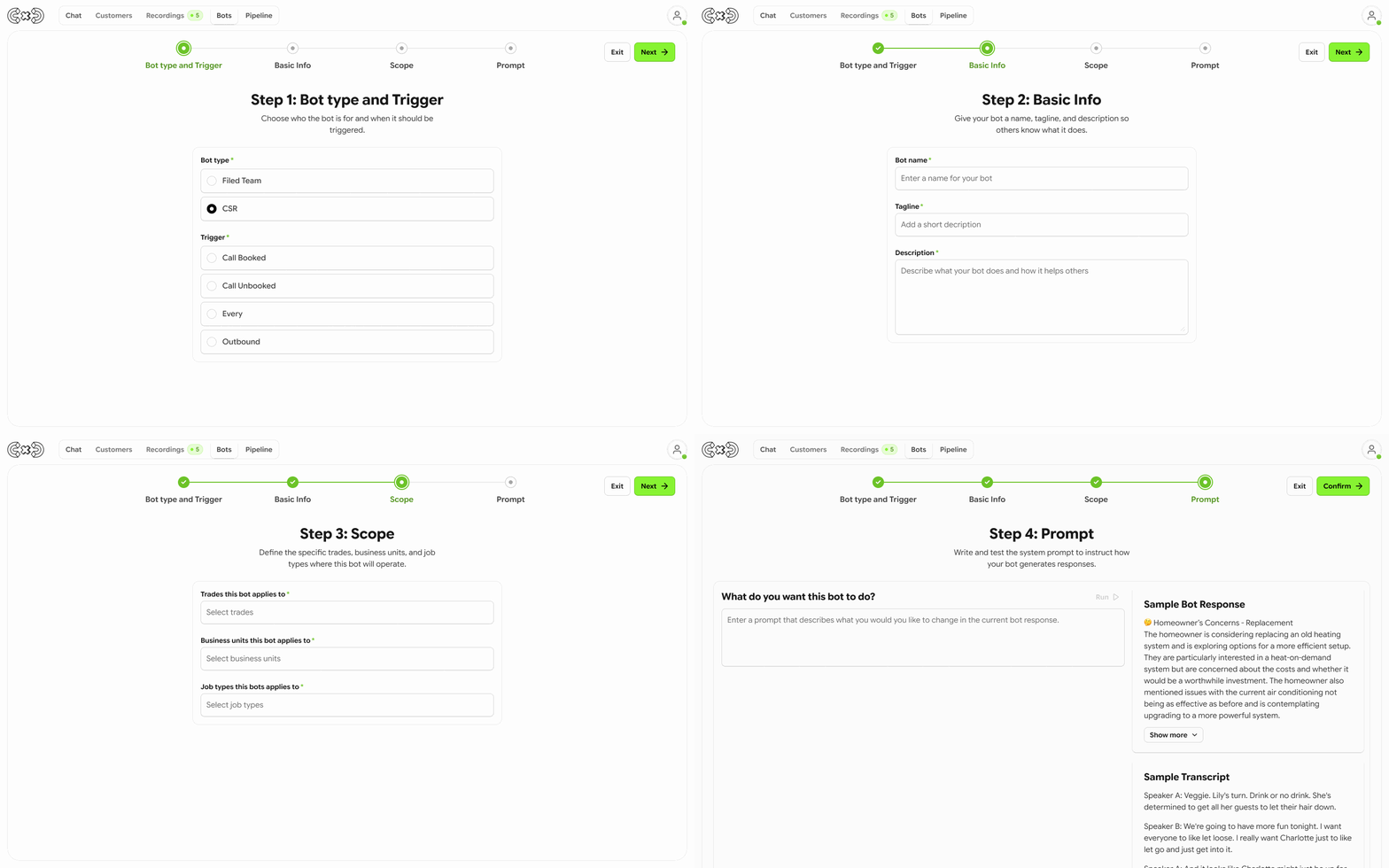
Step 1: Choose the bot type
Pick whether this bot reviews CSR calls or Field Team work. The type decides which triggers are available in the next step, so choose this first. If you change the type later, your trigger selection is cleared and you'll need to pick one again.
Step 2: Choose the trigger
The trigger decides when the bot runs.
For CSR bots, the trigger is Call Complete, and you can narrow it to:
Booked calls
Unbooked calls
Outbound calls
Every call
For Field Team bots, you can choose:
Job Recording Complete, which runs when a recording from the job is finished
Job Complete, which runs on Every completed job or only on jobs that hit a revenue amount you set
Step 3: Add the basic info
Give your bot a name, a short tagline, and a description. Your crew will see these, so make it clear what the bot is looking for.
Step 4: Set the scope
Choose which trades, business units, and job types the bot applies to. The bot only runs on recordings that match. Once you've set a scope, it's shown on the left side of the bot page above the trigger, so you can see at a glance when the bot will run.
Step 5: Write the prompt
The prompt tells the bot what to look for and how to respond. A sample transcript is available as context, so you can test your prompt against a realistic call or visit. Select Run to preview the output, adjust the prompt, and run it again until the feedback reads the way you want.
Publishing and managing your bot
Once your bot is built, you can:
Publish it to make it active in your workspace. Custom bots are only available in the workspace where they were created.
Unpublish it to take it offline. Everything you set up stays saved, and you can publish it again anytime.
Edit it to change anything, including the name, prompt, trigger, or scope.
Delete it to remove it for good. This can't be undone.
A published bot shows as Active. An unpublished bot shows as Inactive and stays in your list until you delete it.
Your bots vs. CxC bots
You can edit and delete any bot you create. CxC bots work differently: you can customize our prompt, but you can't change the trigger, tagline, or other settings, and you can't delete them. If a CxC bot is close to what you need but runs on the wrong trigger, building your own is the way to go.